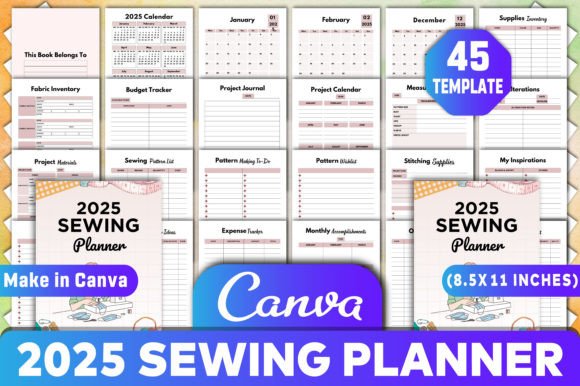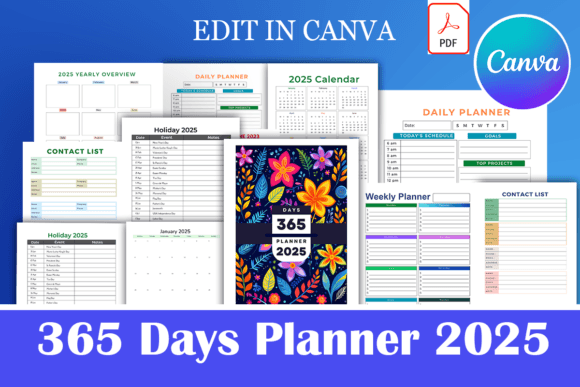
365 Days Planner 2025
The 365 Days Planner 2025 is a comprehensive tool designed to help individuals and businesses maintain structure, track progress, and achieve long-term goals. Whether you're managing a creative project, organizing daily tasks, or planning for the year ahead, this planner offers a structured approach to productivity. It's especially useful for those who want to streamline their workflow without relying on constant external tools or platforms.
How the 365 Days Planner 2025 Fits Into Your Workflow
Integrating the 365 Days Planner 2025 into your routine can enhance your ability to plan, execute, and review tasks effectively. This planner serves as a central hub for organizing everything from daily schedules to long-term objectives. It’s ideal for professionals, educators, entrepreneurs, and anyone looking to improve their time management and goal-setting strategies.
Before starting a new project, use the planner to outline key milestones, set deadlines, and identify necessary resources. During execution, it helps track progress, adjust plans, and stay focused on priorities. After completion, it provides a record of what worked, what didn’t, and how to improve in the future.
Customization and Flexibility
One of the standout features of the 365 Days Planner 2025 is its flexibility. The Canva template allows users to add any elements they need, whether from the free or pro version of Canva. This means you can tailor the planner to fit your specific needs, adding visual elements, icons, or custom layouts that align with your personal style or brand identity.
With the editable Canva link, you can easily modify the design, change colors, or rearrange sections without needing advanced design skills. This makes it an excellent choice for low or no-content businesses that want to maintain a professional appearance while keeping costs manageable.
Key Features of the 365 Days Planner 2025
- Page Size: 8.5×11 inches – ideal for clear visibility and easy printing.
- Colorful Pages: Vibrant designs that make planning more engaging and visually appealing.
- No Bleed Option: Simplifies printing and ensures clean edges when printed at home or professionally.
- 20 Pages Template: A compact yet comprehensive layout that covers essential planning areas.
- 420 Pages KDP Interiors: Perfect for self-publishing or creating a physical planner with high-quality interior pages.
Sections Included in the Planner
The 365 Days Planner 2025 comes with a variety of sections to support different aspects of your life and work. These include:
- Cover Page: A professional front page that sets the tone for the entire planner.
- Monthly Planner: Organize your month by month, tracking events, meetings, and deadlines.
- Contact List: Keep track of important contacts, clients, or collaborators.
- Holiday 2025: Plan around major holidays and special dates throughout the year.
- Daily Planner: Break down your day into manageable tasks and appointments.
- Book To Read: Track your reading progress and set goals for your next book.
- Skills To Learn: Identify and monitor new skills you want to develop.
- Class Snapshot: Ideal for students or educators to track course details and progress.
- Homework Tracker: Stay on top of assignments and deadlines.
- Assessment Tracker: Monitor performance and improvements over time.
- Student Groups: Manage group projects or study sessions efficiently.
- Timetable: Schedule classes, meetings, or personal activities with ease.
- Birthday Tracker: Never miss a birthday again with a dedicated section for reminders.
Integration With Other Tools and Platforms
The 365 Days Planner 2025 works well alongside other productivity tools and platforms. For example, you can sync your digital calendar with the monthly planner to ensure consistency across all your planning methods. If you use task management apps like Trello or Notion, the daily planner can serve as a complementary tool for capturing quick notes and updates.
For creators and designers, the Canva template integrates seamlessly with other design assets, allowing for a cohesive look across all materials. This is especially beneficial for those who run a business or manage multiple projects simultaneously.
Practical Tips for Using the 365 Days Planner 2025
To get the most out of the 365 Days Planner 2025, consider the following tips:
- Start Small: Begin by focusing on one or two sections of the planner, such as the daily planner or monthly planner, before expanding to other areas.
- Set Realistic Goals: Use the skills to learn and book to read sections to set achievable goals that align with your interests and ambitions.
- Review Regularly: Take time each week to review your progress and update the planner accordingly.
- Customize for Your Needs: Use the Canva template to add elements that reflect your unique workflow, such as color-coded sections or personalized icons.
- Print or Digital: Decide whether you prefer a physical planner or a digital version. The 420-page KDP interiors option is perfect for printing, while the Canva template allows for easy digital access.
Long-Term Use and Maintenance
The 365 Days Planner 2025 is designed for long-term use, making it a valuable asset for anyone committed to consistent planning and organization. To maintain its effectiveness, ensure that you update it regularly and keep it in a designated space where it's easy to access.
Over time, you may find that certain sections become more relevant than others. Don't hesitate to adjust the planner to suit your evolving needs. The flexibility of the Canva template ensures that you can make these changes quickly and easily.
Conclusion
The 365 Days Planner 2025 is more than just a planning tool—it's a dynamic resource that supports your workflow, enhances your productivity, and helps you stay organized throughout the year. Whether you're using it for personal development, business management, or creative projects, its customizable design and comprehensive features make it a valuable addition to any planner collection.